소프트쉐어-AI,무료소프트웨어,무료프로그램 공유마켓

본문 바로가기

팝업레이어 알림

팝업레이어 알림이 없습니다.
내 PC의 OS와 브라우저 정보입니다. ex icon
os 알 수 없음
browser 알 수 없음

AOS

지도/내비게이션

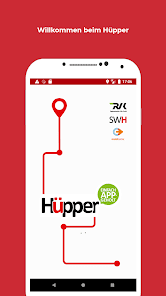
Hüpper - einfach APPgeholt

quotHpper unser neuer Fahrdienst auf Abruf ergnzt das rtliche PNVAngebot einfach buchbar per APP Zum Start des Angebots fhrt der Hpper in einem festgelegten Betriebsgebiet innerhalb von Hrth Dieses erstreckt sich auf die Stadtteile Knapsack Stotzheim und Sielsdorf welche durch den Hpper mit den Haltepunkten der StadtbahnLinie 18 mit Ausnahme Kiebitzweg dem Bahnhof Kalscheuren sowie dem Busbahnhof Hrth Mitte / ZOB angebunden werden Zudem erfolgt eine Bedienung des Friedhofs in Efferen zu dessen ffnungszeiten Auch Fahrten zwischen bzw innerhalb der drei Stadtteile sind mglich sofern die Mindestdistanz von Start und Ziel 700 Meter betrgt Ein intelligentes Hintergrundsystem bildet aus den Buchungen sinnvolle Fahrgemeinschaften Unsere modernen elektrischen London Cabs bieten Platz fr bis zu sechs Personen und verfgen neben der Ausstattung mit USBLadestationen ber hohen Sitzkomfort ein Panoramadach eine ausziehbare Rampe und eine Fixiermglichkeit fr zB einen Rollstuhl Kommen Sie zum Ziel mit maximal 30 Minuten Wartezeit und 200 m Fuweg zu Ihrem HpperHaltepunkt Zusammen mit den einfachen Buchungsmglichkeiten bietet der HpperFahrdienst eine sinnvolle Ergnzung im ffentlichen Nahverkehr in Hrth Bedarfsgerecht und klimafreundlich unterwegs sein mit dem Hpper Einfach APPgeholt Und so funktioniert es 1 Buchung via APP 2 Registrieren Sie sich einmalig fr Ihre erste Fahrt direkt in der APP oder auf der Homepage 3 Start und Ziel angeben 4 Anzahl angeben Fahrgste Mobilittshilfen Rollstuhl Rollator Kinderwagen Gepckstcke Koffer Taschen die ber Handgepckgre hinausgehen 5 Bezahlen Sie direkt in der APP zZt noch in Vorbereitung oder bar beim Fahrer Einzel und 4erTickets knnen beim Fahrer entwertet werden Alternativ das Handyticket in der RVK oder VRSAPP nutzen Es gilt der normale VRSTarif inklusive Abo und JobTicketMitnahmeregelung 6 Geschafft Ihre Route und Zeit wird berechnet Ihre Abfahrtzeit und haltepunkt das Kennzeichen des Fahrzeugs der Name des Fahrers sowie die Ankunftszeit und etwaige Mitfahrer werden Ihnen umgehend mitgeteilt Der Hpper ist rund um die Uhr im Einsatz Immer werktags von Montag bis Freitag zwischen 600 Uhr und 2200 Uhr durch die HpperFahrzeuge in der brigen Zeit ber ein ortsansssiges Taxiunternehmen Details und weitere Infos swhmobilde/huepper oder ber unser Kundencenter Gefllt Ihnen die App Dann freuen wir uns ber eine Bewertung quot
  • 평점
  • 평점 0
  • 무료

1,643

자세히보기

AOS

지도/내비게이션

Advisera OnTrack

Elektronisk och automatisk krjournal fr ansluten tillhrande GPStracker samt sprning av fordon verktyg och entreprenadmaskiner Anslut enkelt tillhrande GPStrackers till OBDIIporten eller extern strmklla i de objekt som ska kopplas upp Krjournal med tillhrande GPStrackers Resehantering Automatisk krjournal godknd av Skatteverket Livekarta Flj alla dina bilar i realtid fr snabbare styrning av verksamheten Fordonshantering Hantera fordon och frare Fraridentifiering Checka in och ut frare Anpassade alarm Pushnotis sms och epost Skerhetszoner F alarm nr fordon ker in och ut ur frbestmda omrden utanfr godknda tider Platser F automatiskt skrivna syften fr vanligt beskta stllen Biltullar F sammanstllning fr privata och tjnsteresor Rapporter Generera rapporter utifrn gjorda resor och annan data Sammanfattning Enklare fakturering av resor till och frn kundsajter och stopptider hos kund Sparar automatiskt Historiken sparas skert i ett skyddsrum i berget Sverige Utrustningskontroll och stldskydd med tillhrande GPStrackers Hantering av utrustning Hantering styrning och stldskydd fr btar fordon verktyg och entreprenadmaskiner Livekarta Flj din utrustning och dina fordon i realtid med tillhrande tracker Skerhetszoner F alarm nr fordon ker in och ut ur frbestmda omrden utanfr satta tider Fjrrstyrning Stt enkelt av och p dina uppkopplade enheter frn appen som maskiner vrmare pumpar Alarm F anpassade larm frn dina uppkopplade objekt som att pumpen startar Objektbeskrivning All ndvndig information och bilder av dina freml Stldanmlan Automatisk anmlan till polis och frskringsbolag Sparar automatiskt Historiken sparas skert i ett skyddsrum i berget i Sverige
  • 평점
  • 평점 0
  • 무료

85

자세히보기

AOS

지도/내비게이션

Bolt.Earth - EV Charging App

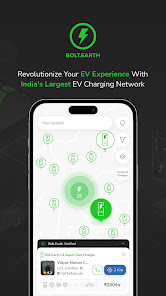
About this app Indias largest EV charging network Recognizing that range anxiety the fear of running out of charge midjourney is a significant obstacle to widespread EV adoption BoltEarth sets out to create a network of affordable universally compatible charging points at strategic convenient locations available 24/7 At BoltEarth our goal is clear to break down the walls of apprehension making EVs not just a choice but the preferred choice for all Why Choose BoltEarth for EV Charging BoltEarth leads as India39s largest EV charging infrastructure provider with over 30000 active charging points across 1300 cities catering to a monthly user base of 159000 EV owners Our userfriendly app streamlines the process of locating accessing and paying for charging your EV How BoltEarth Works Installing a BoltEarth charging point is quick and easytakes less than 30 minutes Simply mount the device power it using three wires and activate it through our app Charge your electric vehicle anywhere from garages commercial spaces RWAs to local kirana shops with BoltEarth Charging Your EV Made Simple in 4 Steps Download the BoltEarth app from Playstore/Appstore Enable location access Choose your nearest BoltEarth charging station and navigate to the location Once there scan the QR code above the charging dock and get started Key Features An Interactive map to find nearby charging points Details on pricing availability and distance Realtime monitoring of charging sessions Energy consumption tracking and booking management Energybased pricing tailored to your usage BoltEarth Wallet for seamless hasslefree charging payments eliminating the need for individual transactions per session Earn with BoltEarth Be a part of BoltEarth39s peertopeer network Share your charging point on our app to help fellow users As a BoltEarth owner add your EV charging point for public use set availability and manage multiple points effortlessly Keep track of energy usage and earn extra income while contributing to our extensive charging network ensuring ample EV range availability Got questions or suggestions Reach out to us at supportboltearth
  • 평점
  • 평점 0
  • 무료

162,427

자세히보기

AOS

지도/내비게이션

Daily Flight Buddy - VFR/NVFR

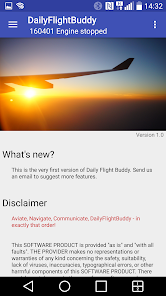
DailyFlightBuddy untersttzt Sie whrend des Flugs VFR/NVFR Von Piloten fr Piloten Flugplanung und Flugaufzeichnung Beginnen Sie Ihren Flug in wenigen Schritten Schritt 1 Prfen/Korrigieren Sie die Flugpltze und Wegpunkte Schritt 2 Erstellen Sie einen Flugplan Schritt 3 Fliegen Sie Features 19000 Luftrume 40000 Flugpltze/Heliports 70000 POI Points of Interests 1000000 Stdte Whrend des Flugs arbeitet die APP ohne Internetverbindung Untersttzung fr Luftrume KMLFormat und AirspaceFormat OnlineKarten fr die Flugroutenerstellung OfflineKarten whrend des Flugs Weltweite Karten Hheninformationen Erstellung von Flugplnen Auswahl der passenden Flughhe durch Anzeige der Hhenprofile Dokumentation Ihres Fluges Backup am Server TabletUntersttzung Automatische Erkennung von MotorStart/Stop Nchstgelegene Funkfeuer Nchstgelegene Landepltze Untersttzung whrend der Einrichtung des Systems Sprachausgabe Zeichenbrett Tag und NachtThema Einheitenauswahl Drag39n39drop in der Karte Lizenzmanagement METAR/TAF/NOTAMs fr Flugpltze Senden Sie GPS Daten vom Quellgert ber Bluetooth auf das Arbeitsgert NMEA GPS Signale via Bluetooth von einem GPS Tracker empfangen NMEA GPS ber USB von einem GPS Tracker einlesen Fge Dateien Bilder oder PDF zu Flugpltzen hinzu Visuelle Gelndewarnungen Testen Sie die APP mit XPlane Von Piloten fr Piloten wir freuen uns auf Ihre Ideen und Verbesserungsvorschlge per Mail Notwendige Berechtigungen Standort zum Navigieren mit GPS Auch whrend die APP im Hintergrund luft Ein Icon in der Benachrichtigungsleiste zeigt immer an ob Standortdaten gelesen werden Netzwerk Die Kartendaten werden aus dem Internet nachgeladen Ruhezustand deaktivieren Whren des Flugs bleibt der Bildschirm aktiv Synchronisieren Die Daten werden am DFBServer gespeichert Mikrofon Die APP erkennt automatisch wenn der Motor des Flugzeugs gestartet bzw gestoppt wird Fotos um Fotos von Piloten oder Flugzeugen zu erstellen Bluetooth um GPS Daten von einem Gert auf ein anderes Gert zu senden
  • 평점
  • 평점 0
  • 무료

535

자세히보기

AOS

지도/내비게이션

ATAK Plugin: Vx

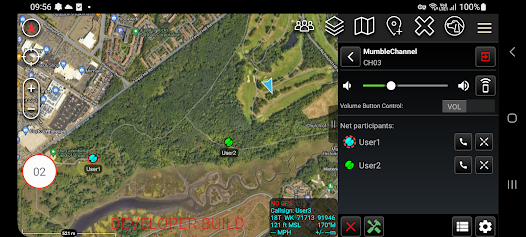
ATTENTION This is an ATAK Plugin To use this extended capability the ATAK baseline must be installed Download the ATAK baseline here https//playgooglecom/store/apps/detailsidcomatakmapappciv The Vx plugin enables voice communication between ATAK users on a local multicast mesh network radio or WiFi or via a private / public Mumble Murmur server Limited testing has shown Vx in multicast mode is compatible with multicast enabled VPNs eg Zero Tier The plugin supports group chats and point to point calls in both modes The default mode of operation is push to talk PTT however the plugin can also be utilised in an 39open mic39 mode the PTT button is available even when ATAK is not the foreground application allowing the continued use of Vx even when the focus is on another application In addition the hardware volume buttons may be configured as PTT buttons Vx is compatible with Bluetooth headsets and is closely integrated into ATAK including highlighting the currently talking user on the map and sharing of channel configuration via Data Package A channel list is provided to show all channel participants / clients Note Channel configurations cannot be shared with older versions of the plugin If this functionality is required then the plugin must be upgraded The plugin allows the creation of missions which define the channels that the user wishes to communicate via Missions can be configured to use IP multicast only Mumble only or combined IP and Mumble communication methods Whenever IP multicast is enabled the plugin also provides an quotEngineering Channelquot which all users in the mission are always listening to in addition to their current channel providing users who require assistance a simple mechanism to request it User Guides A user guide and Mumble server set up guide for the plugin can be found under Settings / Tool Preferences / Specific Tool Preferences / Voice Preferences Best efforts are being made to keep this plugin updated to the same version of ATAKCIV Unfortunately whilst feedback is appreciated we can give no guarantees that requested features will be implemented Permissions notice Accessibility service This app uses an accessibility service solely for the detection of volume button key presses when the PTT function is configured
  • 평점
  • 평점 0
  • 무료

5,708

자세히보기

회원로그인

회원가입

브랜드 소프트쉐어

대표 김동영

사업자번호 428-81-02729

통신판매업신고번호 2023-부산해운대-0096호

개인정보책임자 김동영

주소 : 부산광역시 해운대구 센텀중앙로 78, 센텀그린타워 504호