소프트쉐어-AI,무료소프트웨어,무료프로그램 공유마켓

본문 바로가기

팝업레이어 알림

팝업레이어 알림이 없습니다.
내 PC의 OS와 브라우저 정보입니다. ex icon
os 알 수 없음
browser 알 수 없음

AOS

지도/내비게이션

Drone Vision

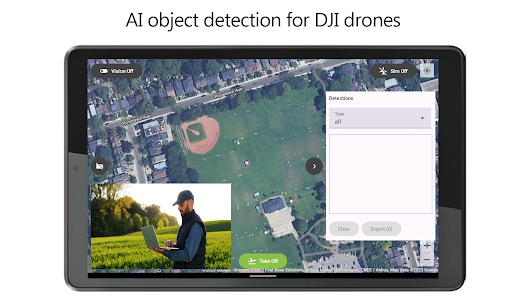
Drone Vision is an app used for AI visionbased object detection for DJI drones The app allows you to run machine vision in real time on the video feed from drones primary camera as you fly the drone The app allows you to view the video stream from the drones primary camera during the flight operation with an overlay showing objects detected with machine vision The free version of the Drone Vision app supports detection of 80 builtin object types To add your own customtrained machine vision model and support for other object types please order the Pro version Drone Vision app is used with DJI drones and requires a DJ RC controller to be connected to the device Following DJI drones are supported 1 Matrice 350 RTK 2 Matrice 300 RTK 3 DJI Mini 3 4 DJI Mini 3 Pro 5 DJI Mavic 3M 6 DJI Mavic 3 Enterprise Series 7 Matrice 30 Series The app was developed by DeepMAVai The app allows you to safely take off land and return to takeoff location by using the flight control panel on the bottom Vision To enable vision first ensure the drone is powered on and connected to the RC Also ensure the RC is powered on and the device is connected to the RC via the USB cable You can check if the drone connection is successful by previewing the camera video by pressing the camera button in the app Pressing the Vision toggle button turns on machine vision mode When on the app performs object detection in real time from drones primary camera video To view detected objects you can open the detection panel on the right side of the screen by pressing the chevron button The detection panel shows currently detected objects number of objects and confidence score All detections are retained while the application is running and may be exported from the app to a CSV file and uploaded to your favorite Cloud storage While vision is on the video preview panel shows the live drone camera video with an overlay showing the location of the detected objects in the frame Simulator Mode Drone Vision app allows you to test your drone flight in simulator mode Simply start the app turn on your drone make sure the RC is connected to the drone and connect the device to the RC Pressing the Sim On/Off button switches between simulator and normal mode When the simulator is turned on the button will show the Sim On status In simulator mode the drone will perform takeoff landing and return to home functions as if it was truly flying You can use the control sticks on the RC to fly the drone manually in simulator mode The map will display the drones simulated location All other functions of the app are enabled including video preview and vision Note that the video preview shows the actual live feed from the drones primary camera and is not simulated No account creation or login required Simply start the app and start flying Make sure to fly responsibly and obey your local drone regulations
  • 평점
  • 평점 0
  • 무료

136

자세히보기

AOS

의료

Blood Sugar Diary for Diabetes

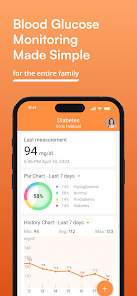
Blood Sugar Diary for Diabetes by MedM is the most connected blood glucose monitoring app in the world It is designed to simplify blood sugar tracking and management The app enables users to log data manually or to automatically capture it from over 50 connected glucose meters via Bluetooth Our Blood Sugar Diary has a clean and intuitive interface and works with or without registration Users decide if they want to keep their health data on their smartphone only or additionally back it up to MedM Health Cloud https//healthmedmcom Blood Sugar Diary for Diabetes can log the following data types Blood Glucose Blood Ketone A1C Blood Cholesterol Blood Pressure Tryglycerides Medication Intake Notes Weight Hemoglobin Hematocrit Blood Coagulation Blood Uric Acid The app is freemium with all basic functionality available to all users Premium Members additionally can sync select data types with other ecosystems such as Apple Health Health Connect Garmin and Fitbit share access to their health data with other trusted MedM users such as family members or caregivers set up notifications for reminders thresholds and goals as well as receive exclusive offers from MedM partners We are serious about data safety MedM follows all applicable best practices for data protection the HTTPS protocol is used for cloud synchronisation all health data is stored encrypted on securely hosted servers Users exercise full control over their data and can at any time export and/or delete their health record MedM Diabetes syncs with the following brands of blood sugar meters AndesFit Betachek Contec Contour Foracare Genexo iSENS Indie Health Kinetik Wellbeing Mio Oxiline Roche Rossmax Sinocare TaiDoc TECHMED Tyson Bio and more For full list of supported devices please visit our website https//wwwmedmcom/sensorshtml MedM is the absolute world leader in smart medical device connectivity Our apps provide seamless direct data collection from hundreds of fitness and medical devices sensors and wearables MedM Enabling Connected Health Disclaimer MedM Health is intended for nonmedical general fitness and wellness purposes only Always consult a doctor before making any medical decisions
  • 평점
  • 평점 0
  • 무료

1,697

자세히보기

회원로그인

회원가입

브랜드 소프트쉐어

대표 김동영

사업자번호 428-81-02729

통신판매업신고번호 2023-부산해운대-0096호

개인정보책임자 김동영

주소 : 부산광역시 해운대구 센텀중앙로 78, 센텀그린타워 504호