소프트쉐어-AI,무료소프트웨어,무료프로그램 공유마켓

본문 바로가기

팝업레이어 알림

팝업레이어 알림이 없습니다.
내 PC의 OS와 브라우저 정보입니다. ex icon
os 알 수 없음
browser 알 수 없음

AOS

생산성

LUCI LIVE

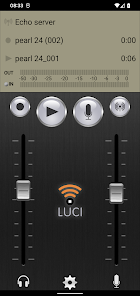
LUCI Live including SE and Lite featurepacks Radio TV Reporters amp Journalists PROFESSIONAL HD QUALITY BROADCASTING APPLICATION Used by ARDBBC ESPN NPO XM NPR and many more LUCI Live is an already well established award winning broadcasting application by Technica Del Arte that allows reporters to stream live audio to and from the studio LUCI Live works twoway is compatible with many different types of professional IPcodecs and is even capable of playing prerecorded material while broadcasting LUCI Live is also built for other mobile and desktop platforms and is well respected by many users Some features N/ACIP or RTP lowdelay streaming twoway so including return channel Record while broadcasting Record video locally on your device while broadcasting Live audio only Stream Audio amp Video Record video all simultaneously including return audio channel Edit audio and video Send files to the studio using SFTP Email Export to other Cloudstorage apps Play prerecorded audio while broadcasting AACLC AACLD AACHE MP2 OPUS and many more professional codecs at 48 kHz samplerate 32 to 384 kbps mono or stereo 24bit ULCC audio codec 441 to 48 kHz samplerate Excellent broadcast quality Redundant streaming using all available network connections Constantly updated to the latest IPtechnology and standards Free helpdesk via email To connect a professional microphone and headset MIKI cables for iPhone can be ordered at https//wwwtechnicadelartecom Suitable for Android 6 devices or higher LUCI Live is the general app which allows you to use it with LUCI Live SE LUCI Live Lite or the full LUCI Live functionality depending on the your license Pleas Note This is a Demo version it will send 1 sec silence every 20 seconds
  • 평점
  • 평점 0
  • 무료

5,724

자세히보기

AOS

생산성

Outliner

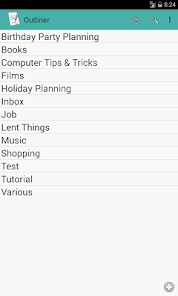
쇼핑 목록작업할일 목록아이디어 및 모든 종류의 메모를 구성합니다 또 Outliner를 프로젝트 관리 도구로 사용하십시오 접을 수 있는 트리 구조에서 모든 작업을 수행합니다 특징 무제한 목록 접을 수 있는 트리 구조 할일 보기 상태 마감일 가져 오기csv Natara Bonsai Treepad HJT Treeline TRLN OPML 일반 텍스트 내보내기csv Natara Bonsai 설정 가능한 모양 빠른 편집 스와이프하여 활동을 왼쪽 또는 오른쪽으로 이동 이동 모드 드래그 앤 드롭 색상 언어 영어 프랑스어 독일어 일본어 스페인어 러시아어 한국어 PRO 버전 특징 HTML 내보내기 가져오기/내보내기 csv Natara Bonsai Treepad HJT Treeline TRLN OPML 일반 텍스트 Google Tasks 동기화 2 단계 Natara Bonsai 동기화 USB 및 Dropbox Treepad 동기화 HJT USB 및 Dropbox Treeline 동기화 TRLN USB 및 Dropbox OPML 동기화 USB 및 Dropbox 예 OmniOutliner FileManagers 또는 클라우드 앱 예 BoxCryptor ownCloud EDS TrueCrypt으로 목록 열기 자동으로 트리 가지 만들기 완료 옵션 추가 보기 기한 보기 해시 태그 보기 완료된 활동 선택 취소 완료된 활동 삭제 검색 SD 카드로 모든 아웃 라인 백업 복원 아웃라인 바로가기 단축키 테마 하위 트리 잘라 내기 복사 붙여 넣기 리스트 구분 포함 하위 트리 확장 축소 활동 목록에 대한 기본보기 구성 텍스트 공유 대상 목록 공유 목록 리스트 순서 수동 정렬 활동 기한에 대한 알림 서식있는 텍스트 활동 노트의형식 권한 저장 가져 오기내보내기 동기화 백업을 위해 SD 카드에 액세스 연락처 Google Tasks Sync 용 Google 계정 찾기 시작시 실행 부팅시 백업 일정 갱신 네트워크 액세스 동기화 용 Dropbox Google Tasks 바로가기 설치 목록에 대한 실행 바로가기 용 로그 정보 읽기 선택적 로그 파일을 개발자에게 보냅니다 계정 정보에 대한 공식 권한이 quot연락처quot라고 하더라도 Outliner는 귀하의 연락처를 읽을 수 없으며 읽을 수도 없습니다 Outliner는 기기의 Google 계정을 나열하면 Google Tasks 동기화를 위해 하나를 선택할 수 있습니다 이 권한을 거부하면 Outliner는 정상적으로 작동하지만 Google Tasks Sync를 사용할 수 없습니다 PRO 버전 PRO 기능을 사용하시려면 Google Play 스토어에서 quotOutliner Pro Keyquot를 설치하십시오
  • 평점
  • 평점 4.7
  • 무료

55,201

자세히보기

회원로그인

회원가입

브랜드 소프트쉐어

대표 김동영

사업자번호 428-81-02729

통신판매업신고번호 2023-부산해운대-0096호

개인정보책임자 김동영

주소 : 부산광역시 해운대구 센텀중앙로 78, 센텀그린타워 504호